YOUR RECORDS, READY WHEN asked.
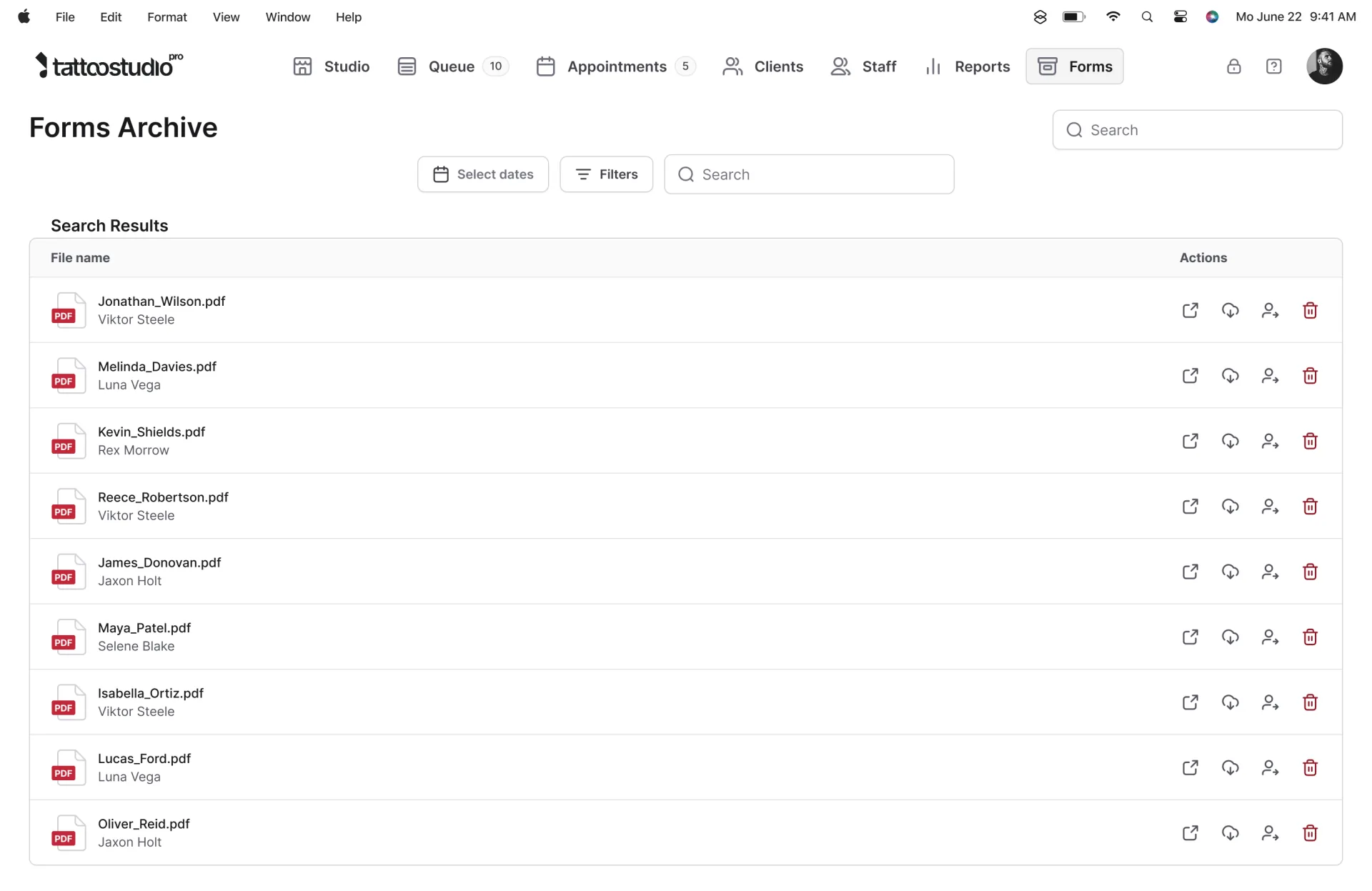
The inspector wants last month's consent form for one client, the lot number on the black you used, and the safety data sheet for your surface disinfectant. In Tattoo Studio Pro those are in the same app you check clients in with: the signed PDF, the lot printed on it, and the SDS filed under Compliance.
Tattoo shop compliance software for the records you already owe.
If you're shopping for tattoo studio compliance software, start with what gets asked for. Rules change from county to county, but the asks repeat. A signed consent for a named client. Proof you checked their ID. Which ink and needle lots went into them. Your permit, each artist's license, the bloodborne pathogens certificates, and an SDS for the chemicals on the shelf.
Most studios keep those in four places: a tablet app for forms, a notes box for lot numbers, a binder in the back, and someone's camera roll. Tattoo Studio Pro puts the forms, the lots, and the documents in one app on web and mobile, with a separate sign-in you can hand the inspector.
Tattoo health inspection software can't do the inspection for you. This page covers what Tattoo Studio Pro stores. For what an inspector usually walks through, read the tattoo shop health inspection guide.
What's in the compliance toolkit.
Signed forms that stay signed
Clients complete intake, the health questionnaire, and acknowledgements, then sign. A PDF is saved to their profile and the Forms Archive, where nothing can be changed or deleted.
Ink and needle lots per client
Tick the inks and needles you used at the staff form. The lot numbers fill in from your catalog, print on the consent PDF, and stay on that visit.
SDS, permits, and certificates
Upload safety data sheets, licenses, certificates, inspection reports, and insurance. Label them, file them in one of six categories, and find them by search.
A free Health Official sign-in
Give an inspector their own account. They can view and download the Forms Archive and open your compliance documents. It does not use a staff spot.
Photo ID before the form
Turn on ID First to require a photo ID before forms are completed. Online check-in can ask clients to photograph their own ID, front and back.
Optional last meal check
An off-by-default questionnaire section. A client who has not eaten cannot check in until they have, and the answer prints on the consent PDF.
Tattoo ink lot tracking with the Supply Log.
Lot numbers change when you open a new bottle, not on every client. So the Supply Log asks for each lot once. You build a catalog of the inks, needles, and other supplies you use, each with the lot number on the bottle or box in front of you. Every client after that inherits it until you change it.
Logging a client takes a few ticks
On the staff form, above the Notes box, select Log supplies and tick what you used. Shop stock and the artist's own items appear together, favorites first, each row labeled Shop or with the artist's name. Borrowed a colleague's bottle? Type over the lot for that one client. Opened a new bottle? Save the new lot to the catalog and every future client gets it.
Under each lot you'll see when it was set, and anything older than three months turns amber. A wrong lot number on a record is worse than a blank one, so an old lot is made to look suspect.
Where the record ends up
- On the signed consent PDF, under Studio Information, grouped by category with the lot beside each item.
- On the client's profile, under that visit on the Forms tab, showing what was used and by which artist.
- Frozen on the visit. Rename or delete a catalog item later and an old consent form still shows what it showed then.
Search matches brand, name, type, and lot number. When a manufacturer recalls a batch, searching that lot is how you find every client it touched. In May 2025 the FDA named two tattoo ink lots contaminated with bacteria and told artists to stop using them.
Optional until you need it
The Supply Log is optional by default. If your health department tracks lots, a manager can require a supply log before a form is finalized, and require a lot number for Inks, Needles, Other, or any mix. Plenty of places track pigment lots and treat single-use needles differently, which is why it's per category. Artists can open the Supply Log settings to manage their own kit, and they can't see anything else in Settings.
The Supply Log is a tattoo supply log, not an inventory tool. There are no stock counts, no reorder alerts, and nothing is deducted when you log a client. See how the Supply Log works →
SDS, permits, and certificates in Compliance Documents.
Compliance Documents gives the paperwork you have to keep on hand one home, under Compliance in the side menu. Upload a PDF, JPG, or PNG up to 20 MB, give it a label your team will recognize, and pick a category.
Six categories
- Safety data sheets for your inks, cleaners, and disinfectants
- Licenses and permits, for the studio and each artist
- Certifications, like bloodborne pathogens, CPR, and first aid
- Inspection reports from past visits
- Insurance, such as your certificate
- Other, for anything that doesn't fit
Search by label or file name, or filter to one category. Owners and managers add, edit, and delete documents on the web. Everyone else on the team, including a Health Official account, can open them on web or mobile without being able to change them.
The federal hazard communication rule says safety data sheets must be readily accessible to employees during each shift, and 29 CFR 1910.1200(g)(8) allows electronic access as long as nothing gets in the way of immediate access. An app needs a charged device and a connection. If your rules or your Wi-Fi make that a risk, keep the paper copy too. For PPE and the rest of the federal rules, see OSHA requirements for tattoo shops.
What it won't do
It stores documents. It doesn't track expiry dates, send renewal reminders, or pull new SDS from manufacturers. You can't swap a file in place: to replace an expired permit, upload the new one and delete the old one. Deleting removes the file for everyone and can't be undone. Studio and artist license numbers can also be saved as optional fields on the account. For what each state asks of licenses, see license renewal by state or the guides for California and Texas. See how Compliance Documents works →
Signed forms stay the way they were signed.
Clients fill in their details, your health questionnaire, and the acknowledgements you've set, then sign with a finger or stylus. Tattoo Studio Pro saves the result as a PDF on the client's profile and in the Forms Archive. The PDF holds every answer, the signature, the completion date, and studio information.
The archive is view only. You can open, download, and print a form, and there is no edit or delete button. If you're comparing tattoo studio audit software, ask every vendor whether a signed form can be changed later. Managers and Health Officials open the archive directly. Artists open a client's forms from the client profile. Search by first name, last name, or file name, and narrow it by date range or artist. Forms can run in more than one language when you turn that on in the Form Editor.
The form setup lives on digital forms. Need wording for the document itself? Start with our tattoo consent form guide.
ID checks before the form.
Turn on ID First and a photo ID is required before forms are completed. On the client profile, Photo ID sits apart from attachments and is there for age verification.
Clients can also do intake on their phone before they reach the chair, through a check-in link or the QR code at your counter. Online photo ID upload is off by default. Turn it on and clients photograph their own government ID, front and back, and a photo is required to submit. Leave it off and they see a note to bring a valid photo ID to be checked in person.
Clients under 18 are the exception. With minors with a parent turned on, parent or guardian fields appear on the in-studio form. The online link can't capture that consent, so minors should finish check-in in the studio. What your state allows is covered in state-by-state digital consent form rules.
A sign-in for the inspector.
Add the inspector to your team with the Health Official role and they sign in with their own account. They can view and download the Forms Archive and open your compliance documents. They can't change those documents.
Health Official accounts are free on every plan and never count toward your staff limit. Nobody has to lend out a staff login or hand over the front desk tablet. More on roles is on team accounts.
If the inspector uses your counter tablet, lock it first. A locked device shows your logo and three buttons (Portfolios, New Client, Returning Client), with no queue, calendar, client records, settings, or reports in view. Details are on security and access.
An optional check that clients have eaten.
Some jurisdictions want studios to confirm a client has eaten before the procedure. Food Safety / Last Meal Verification is an optional section in Form Editor, off by default. Clients enter when and what they last ate, confirm they've eaten, and agree to an acknowledgement you can edit to match your local wording.
An "I have not eaten today" answer stops the form. The client can't check in until they've eaten and changed the answer, and there's no staff override. The answer prints on the consent PDF. The lightweight walk-in "join the queue" link skips this section, because the full intake happens in the studio. See how it works →
Keep your own copy.
Good tattoo record keeping software should let you leave with your records. In Settings > Backup you can download a ZIP of your archived intake forms as PDFs, and a CSV of client records with the columns you pick. Keep the ZIP for offline records, external storage, regulatory compliance, or long-term archiving. Only forms with a generated PDF are included.
Exported client data is still client data, so store it in line with the privacy rules that apply to you. If a subscription lapses, the studio loses access to features, but the data is kept and everything picks up when you resubscribe. Weighing paper against an app? Read paper vs digital records. See how Backup works →
What this does not do.
Tattoo shop legal compliance is still your job. Your health department's rules apply, and software doesn't change that. Tattoo Studio Pro stores the records and puts them in front of you when someone asks.
There's no sterilization or spore-test log, no expiry or renewal reminders for licenses and certificates, no training course, and no inventory count. The optional pieces (Supply Log requirements, ID First, online photo ID, minors with a parent, the last meal check) stay off until a manager turns them on. Adding and editing compliance documents happens on the web. No app can promise you'll pass an inspection, and this one doesn't. For a prep list, use the health department audit checklist.
The details
Small numbers, on the record.
On every plan.
All Tattoo Studio Pro plans include every feature on this page. Plans differ only by how many team members can be active at the same time, from $29/mo. See pricing. SMS reminders are unlimited on every plan too.
Quick answers.
What should tattoo shop compliance software keep?
At minimum: signed consent forms that cannot be edited later, a record of the ID check, the ink and needle lot numbers used on each client, and your safety data sheets, licenses, and certificates. Rules vary by health department, so check what yours asks for.
Is the Supply Log required?
No. It is off by default, and if your catalog is empty nothing is required of you. A manager can require a supply log before a form is finalized, and can require lot numbers for Inks, Needles, Other, or any combination.
Can an inspector have their own login?
Yes. Add them with the Health Official role. That account can view and download the Forms Archive and open your compliance documents without being able to change them. Health Official accounts are free and never count toward your staff limit.
Can anyone edit a signed form in the Forms Archive?
No. The archive is view only. You can open, download, and print a form, and there is no edit or delete action. It is a record of what the client signed.
Does this replace my paper SDS binder?
Not automatically. Compliance Documents is storage you open in the app, so it needs a working device and connection. If your health department or your own rules call for a paper copy in the shop, keep one.
Can clients under 18 use the online check-in link?
They should finish check-in in the studio. The online link cannot capture parent or guardian consent. On the in-studio form, parent or guardian fields appear for clients under 18 when you have turned on minors with a parent.
Does Tattoo Studio Pro remind me when a license or certificate expires?
No. Compliance Documents stores the files. It does not track expiry dates or send renewal reminders. To replace an expired permit, upload the new file and delete the old one.
Are these tools on every plan?
Yes. All Tattoo Studio Pro plans include every feature. Plans differ only by how many team members can be active at the same time.